
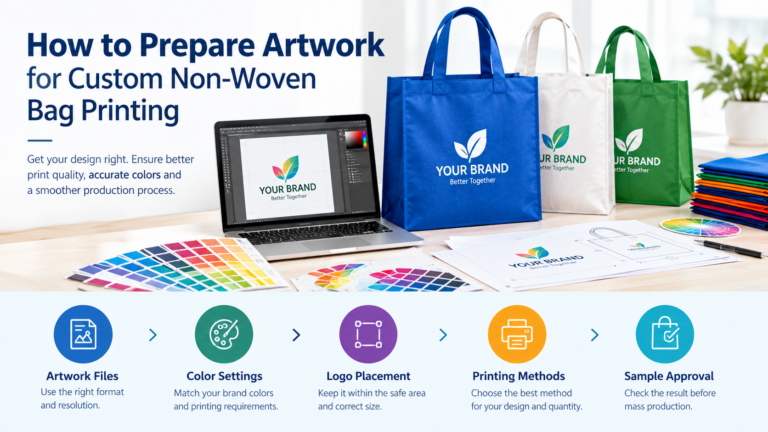

Custom non-woven bags are widely used by retailers, supermarkets, promotional agencies, event organizers, and consumer brands. They provide practical carrying space while giving businesses an opportunity to showcase their logos, brand colors, and marketing messages.
However, even a well-designed logo can produce disappointing results if the artwork is not prepared correctly. Blurry graphics, incorrect colors, unreadable text, and poorly positioned logos can affect the appearance of the finished bags and lead to additional sampling or production adjustments.
For B2B buyers, preparing print-ready artwork is an important step in ensuring a smooth custom bag project.
This guide explains how to prepare artwork for custom non-woven bag printing, which file formats to use, how to manage colors and print placement, and how to choose the most suitable printing method for your design and order quantity.
1. Understand Your Bag Specifications Before Designing
Before preparing artwork, confirm the bag specifications with your manufacturer. Designing a logo without knowing the available printing area can result in a layout that needs to be resized or rearranged later.
Start by confirming the following details:
- Bag dimensions: Width, height, and gusset depth.
- Material: Standard PP non-woven fabric or laminated non-woven material.
- Fabric weight: The GSM specification, which affects the feel and construction of the bag.
- Bag color: White, natural, black, or another custom color.
- Printing sides: Front only, back only, or both sides.
- Printing area: The maximum dimensions available for the design.
- Bag construction: Handle type, seams, reinforced areas, and bottom structure.
For example, a logo positioned correctly on a flat front panel may become too close to a seam or handle attachment on another bag style.
Request an artwork template
Whenever possible, ask your supplier for a product-specific artwork template or dieline before designing the final file.
The template should indicate the printable area and any important construction boundaries. Follow the manufacturer’s specifications for margins, bleed, and safe zones rather than relying on generic measurements.
This simple step can reduce revisions and help the production team understand your intended layout.
2. Choose the Right Artwork File Format
The file format you provide affects how easily your manufacturer can prepare the design for printing.
Vector files: AI, EPS, and vector PDF
Vector artwork is generally preferred for logos, text, icons, and illustrations made from shapes and paths.
Unlike raster images, vector graphics can usually be resized without becoming pixelated. This makes them useful when adapting a logo for different bag sizes or print dimensions.
Common vector formats include:
- Adobe Illustrator files (.AI)
- Encapsulated PostScript files (.EPS)
- Print-ready PDF files containing vector artwork
Before submission, confirm whether your supplier requires fonts to be converted to outlines and whether the file needs to follow a particular PDF standard.
Keep an editable master copy before converting text to outlines, since outlined text is no longer directly editable as a font.
Raster files: PNG, JPG, and TIFF
Raster images are made from pixels. They are useful for photographs, textured artwork, and certain complex graphics.
If your artwork contains raster elements, a common starting point is 300 DPI at the final intended print size. The actual requirement may vary according to the printing process and the supplier’s equipment.
For example, a small logo downloaded from a website may look sharp on a phone but become visibly pixelated when enlarged for a shopping bag.
PNG can be useful when a transparent background is needed, while JPG is commonly used for photographs. TIFF may also be accepted for high-quality image files.
Supplier requirements vary, so confirm the accepted format before submitting your artwork. General printing guidance also recommends using vector files where possible and high-resolution raster images when needed. <Cite refs={[“turn122694search2″,”turn122694search7”]}/>
3. Set Up Colors Correctly for Printing
Color consistency is especially important for businesses that use branded bags across multiple retail locations, marketing campaigns, or product launches.
A logo that appears one way on a computer screen may look different when printed on non-woven fabric.
Understand RGB, CMYK, and Pantone
RGB is primarily used for digital displays. CMYK is a process-color model commonly used for full-color printing. Pantone references can be useful when a specific brand color needs to be matched using a spot-color system.
Which color setup is correct depends on the printing method.
For simple, solid-color logos: Ask whether the manufacturer requires Pantone or another spot-color specification.
For full-color artwork: Confirm whether the file should be supplied in CMYK and whether any color conversion will be performed by the printer.
For strict brand-color requirements: Provide the relevant color references and request a physical print sample before approving bulk production.
Converting RGB artwork to a print color space can change the appearance of bright or highly saturated colors. A color that looks vivid on a backlit screen may not be reproducible in exactly the same way on fabric. <Cite refs={[“turn122694search11″,”turn122694search4”]}/>
Consider the color of the bag itself
The bag’s base color also affects the final appearance of the design.
A dark logo on a white or cream bag may be easy to read. The same dark logo on a black or navy bag could lose contrast.
When printing light-colored artwork on dark material, ask whether a suitable white underbase or another preparation step is required for the chosen process.
For the clearest result, review the artwork against a mockup of the actual bag color rather than evaluating the logo in isolation.
4. Design Within the Printable Area
A common artwork mistake is making the logo too large or placing important elements too close to the bag’s edges.
Before finalizing the layout, check the following points.
Keep important elements inside the safe area
Text, logos, QR codes, and essential brand details should remain within the safe area specified by the manufacturer.
As a general design principle, avoid placing important content close to seams, folds, handles, or edges. The exact clearance should be confirmed using the supplier’s template.
Check logo proportions
Do not stretch or compress your logo simply to fill more space. Maintain its original proportions so the brand remains recognizable.
If the logo looks too small at the available print size, consider a simplified version designed specifically for packaging.
Make text readable
Small text can be difficult to reproduce clearly on a textured non-woven surface.
Avoid unnecessarily thin fonts, extremely small legal text, and fine decorative elements. If your bag needs a website address, slogan, or QR code, check its legibility at the actual printed size.
For QR codes, use adequate contrast and request a printed sample that can be scanned before approving production.
Account for seams and handles
The top of the bag, side gussets, and handle attachment areas can limit the usable design space.
If your artwork needs to extend across multiple panels, discuss the construction and alignment requirements with the manufacturer before preparing the final file.
5. Select the Right Printing Method for Your Artwork
Preparing artwork correctly also means choosing a printing method that suits the design.
A simple logo with two solid colors does not necessarily need the same process as a full-color illustration covering most of the bag.
The main options include screen printing, heat transfer printing, flexographic printing, and rotogravure printing for suitable laminated constructions.
Screen printing: Best for simple logos and solid colors
Screen printing transfers ink through a prepared mesh screen onto the bag material.
It is often a practical choice for company logos, promotional bags, event merchandise, and retail bags featuring a limited number of solid colors.
Artwork preparation tips:
- Use vector artwork whenever possible.
- Keep colors clearly defined.
- Avoid unnecessary gradients and complex effects if the chosen process cannot reproduce them effectively.
- Confirm the minimum line thickness and text size with the supplier.
For suitable bulk orders, screen printing can offer an efficient balance between print quality and cost.
Heat transfer printing: Best for detailed, multicolor designs
Heat transfer printing uses a transfer material and controlled heat and pressure to apply artwork to the bag.
Depending on the transfer technology, it can accommodate more detailed graphics, multiple colors, and certain gradients.
Artwork preparation tips:
- Supply high-resolution raster artwork or vector files as requested.
- Confirm the required color mode and background treatment.
- Check whether transparent areas should remain unprinted.
- Ask the supplier to test adhesion and appearance on the selected non-woven material.
Because polypropylene-based materials can be sensitive to heat, the process must be compatible with the bag material and construction.
Flexographic printing: Best for suitable high-volume projects
Flexographic printing uses flexible printing plates and is often integrated into continuous material production.
It may be suitable when large quantities of bags use consistent artwork and the manufacturing process supports printing on rolls before bag conversion.
Artwork preparation tips:
- Supply production-ready artwork with clearly defined colors.
- Confirm plate and setup requirements.
- Ask about repeat-order consistency.
- Check whether the design is suitable for the available printing line.
The method is not automatically the best option for every large order. Setup costs, artwork complexity, and the manufacturer’s production capabilities should all be considered.
Rotogravure printing: Best for certain laminated bag designs
Rotogravure printing uses engraved cylinders to transfer ink onto a compatible surface. For non-woven bags, it may be used to print on film that is subsequently laminated to the fabric.
This process can suit detailed, full-color graphics on laminated bags.
Artwork preparation tips:
- Confirm the film and lamination structure.
- Provide final artwork dimensions and color specifications.
- Check how the design will align with the finished bag panels.
- Approve a sample of the complete laminated construction.
The additional setup and materials may make this approach less practical for smaller orders.
Quick comparison
| Printing method | Artwork best suited for | Important consideration |
|---|---|---|
| Screen printing | Simple logos and limited solid colors | Line thickness and spot-color setup |
| Heat transfer | Detailed graphics and multicolor artwork | Transfer durability and material compatibility |
| Flexographic | Repeated designs for compatible high-volume production | Plate setup and production-line requirements |
| Rotogravure with lamination | Detailed graphics on laminated bags | Film specifications and setup costs |
There is no universal winner. The best method depends on the artwork, material, bag construction, quantity, budget, and quality expectations.
For a more detailed comparison, read our guide to choosing the best printing method for custom non-woven bags.
6. Prepare Separate Files for Front and Back Printing
If your bags require different artwork on each side, make the file structure easy for the production team to understand.
For example, use clear filenames such as:
BrandName_NonWovenBag_Front.pdfBrandName_NonWovenBag_Back.pdf
If the front and back use the same artwork, state that clearly in your order specifications.
For more complex designs, identify each printed panel and indicate the intended orientation. This is particularly important when bags include gussets, large side panels, or artwork that must align across different sections.
Never assume the factory will infer your intended layout from a single image or an informal email.
7. Include Fonts, Layers, and Special Instructions
Before exporting the final file, check that the document is production-ready.
Convert or package fonts
If the supplier requires outlined fonts, convert the text to outlines in the final production file. Keep an editable copy separately.
This helps prevent font substitution when the file is opened on another computer.
Organize color layers
For artwork that uses multiple spot colors, keep the color separations clear if requested by the printing team.
Remove unused elements and make sure the final file does not contain hidden draft artwork or alternative logo versions.
Identify special effects
If the design uses gradients, transparency, fine lines, or other effects, confirm that the chosen printing method can reproduce them appropriately.
For a simple screen-printed logo, a clean design with solid color areas is often easier to produce consistently than artwork containing many subtle effects.
Label special requirements
Clearly state any requirements for:
- Brand-color matching
- White ink or underbase
- Front and back printing
- Print placement
- Orientation
- Artwork version number
A clear file and specification sheet help reduce misunderstandings between the buyer, designer, and manufacturer.
8. Approve a Physical Sample Before Mass Production
A digital proof is useful for checking layout, proportions, spelling, and general appearance. However, it cannot fully represent how ink or transfer materials will look on the actual bag.
Before approving a large order, review a physical sample whenever the project requires strict color matching, complex artwork, or a particular print finish.
Check the following:
- Is the logo correctly positioned?
- Are the colors acceptable?
- Is the text readable?
- Are fine lines and small details visible?
- Does the print adhere properly?
- Does the design look right on the selected bag color?
- Are both sides and all panels correct?
For repeat orders, retaining an approved sample and documented specifications can help maintain consistency.
Do not authorize mass production until the final artwork and required sample approvals are complete.
9. Common Artwork Mistakes to Avoid
Even experienced buyers can overlook small details when preparing files for custom packaging.
Using a low-resolution logo
A logo copied from a website or presentation may not have enough detail for large-format printing.
Solution: Request the original vector file from your design team or brand owner.
Choosing colors without print references
A visual reference alone may not provide enough information to reproduce a brand color consistently.
Solution: Supply agreed color codes and confirm the expected result with a sample.
Ignoring the material’s texture
Artwork that looks smooth on a monitor may appear different on non-woven fabric.
Solution: Evaluate the design on the actual material, using the intended printing method.
Placing the logo too close to the edges
Important content can become crowded by seams, handles, or construction boundaries.
Solution: Use the manufacturer’s template and keep critical elements within the specified safe area.
Submitting artwork before confirming the printing method
Different printing processes have different technical requirements.
Solution: Confirm the process with your supplier before finalizing the production file.
Skipping sample approval
A digital preview does not guarantee that the finished product will match every detail on screen.
Solution: Review the sample, record any changes, and approve the final version in writing.
10. Print-Ready Artwork Checklist for Business Buyers
Use this checklist before sending your artwork to a custom bag manufacturer.
-
Confirm the bag dimensions, material, and color.
-
Obtain the manufacturer’s artwork template.
-
Confirm the printable area and safe zones.
-
Provide a vector logo or high-resolution image.
-
Follow the required color mode and color references.
-
Check font outlines and minimum line thickness.
-
Confirm the printing method and any special preparation requirements.
-
Label front, back, and other printed panels clearly.
-
Check spelling, logo proportions, and artwork placement.
-
Request and review a physical sample when needed.
-
Approve the final artwork and sample before bulk production.
Completing these checks before placing an order can reduce avoidable revisions and make communication with your supplier more efficient.
Order Custom Non-Woven Bags for Your Business
Preparing artwork correctly is an important part of producing custom non-woven bags that meet your branding and quality requirements.
The process begins with clear bag specifications, suitable artwork files, accurate color references, and a layout that respects the available printing area. The next step is choosing a printing method that fits the design, order quantity, and budget.
Whether you are sourcing promotional bags for an event, shopping bags for a retail chain, or branded bags for wholesale distribution, communicating these requirements early can help your manufacturer recommend an appropriate production solution.
Explore our custom non-woven bags for business branding and wholesale supply to learn more about customized bag options for business applications.
When requesting a quotation, prepare your logo file, preferred bag size and material, estimated quantity, printing requirements, and target delivery date. These details will help your supplier assess the project and provide a more relevant recommendation.
Frequently Asked Questions
What file format is best for custom non-woven bag printing?
Vector formats such as AI, EPS, and vector PDF are generally preferred for logos and text. High-resolution PNG, JPG, or TIFF files may be accepted for raster artwork, depending on the printing method and supplier requirements.
What resolution should my artwork have?
For raster images, 300 DPI at the final print size is a common starting point. Some processes may have different requirements, so confirm the specification with your manufacturer before submission.
Should I use RGB or CMYK for my artwork?
CMYK is commonly used for full-color printing, while spot-color printing may require specific Pantone references. The correct setup depends on the printing process, so follow the supplier’s instructions.
Which printing method is best for a simple company logo?
Screen printing is often a practical option for simple logos and limited solid colors. The final recommendation should account for the bag material, artwork, quantity, and production capabilities.
Can I use a photograph on a non-woven bag?
Potentially, yes. Detailed images may require heat transfer, compatible digital printing, or another suitable process. Ask your supplier to confirm the method and provide a sample if image quality is important.
Why should I approve a physical sample?
A physical sample lets you evaluate the actual print, color, placement, adhesion, and appearance on the chosen material. It helps identify issues before they affect the full production order.